A Free Trading Journal for Interactive Brokers
Connect IBKR through its read-only Flex Web Service and sync your trades, or import the Activity Statement as a file. Stocks, options and futures land in a journal with analytics, mistake tracking, Ghost Mode and AI insights. Free, no subscription, no trade limit.
- Flex Web Service sync (beta): a token and a Trades Flex Query, nothing that can trade
- Activity Statement, Flex Query CSV and Transaction History files are detected automatically
- Commissions come from IBKR and the net result follows your statement
Two ways to get your IBKR trades in
Connect once and the sync runs on its own, or import a statement whenever you like. Both are read-only and both skip trades you already have.
Flex Web Service sync
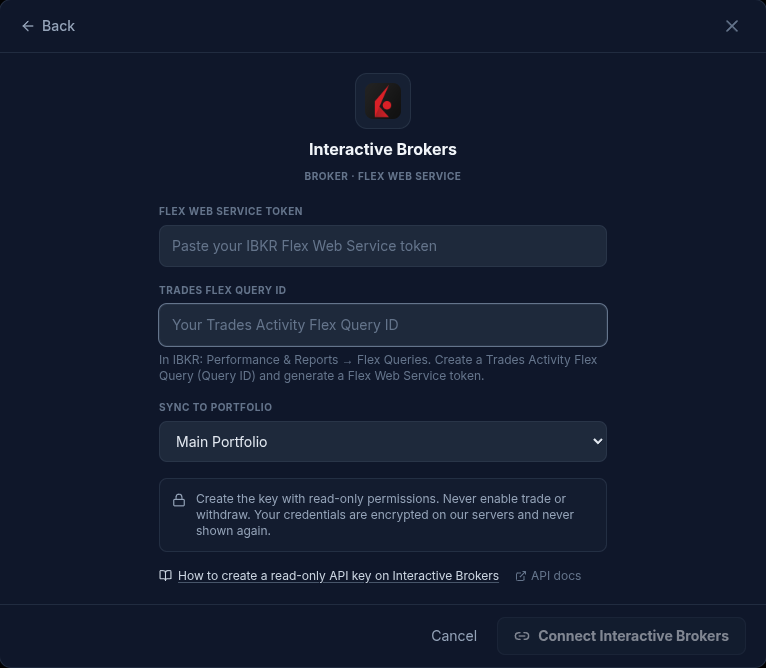
BetaIn IBKR, under Performance & Reports → Flex Queries, create a Trades Activity Flex Query and generate a Flex Web Service token. Paste both in Settings → Connections: new trades then arrive on their own, and Sync Now runs the sync whenever you want. SniperJournal keeps the realized P&L IBKR reports and the commission of each trade; open positions without a close are not saved as trades.
Activity Statement (CSV or XLSX)
Recommended fileThe multi-section statement from Performance & Reports → Statements. SniperJournal reads the Trades section, including the Spanish-language variant, and pairs opening and closing orders into one trade per position: entry and exit prices and times, direction and both commissions. The net result is IBKR's Realized P/L.
Flex Query CSV (Trades)
One row per fillThe CSV a Trades Flex Query downloads: one execution per row with asset class, strike, expiry, multiplier and NetCash. Fills are paired with FIFO position accounting and the P&L comes from the net cash, which already includes commissions.
Transaction History
Also detectedThe Transaction History statement (Date, Description, Transaction Type, Symbol, Quantity, Price, Commission, Net Amount) imports too, including accounts in currencies other than USD.
Not importable: the statement saved as a web page
The HTML version of the Activity Statement is a styled web page, not data. If you upload it, the importer tells you to download the CSV or XLSX of the same statement instead.
Connect Interactive Brokers in four steps
- 01
Create a Trades Flex Query in IBKR
In Client Portal open Performance & Reports → Flex Queries and create an Activity Flex Query that includes Trades. Note its Query ID.
- 02
Generate a Flex Web Service token
In the same Flex Queries page, enable the Flex Web Service and generate a token. It only allows downloading the reports you defined; it cannot place orders or move funds.
- 03
Connect it in SniperJournal
Open Settings → Connections, choose Interactive Brokers, paste the token and the Query ID and pick the portfolio your trades will land in. Click Sync Now to import right away; after that the sync runs on its own.
- 04
Or just import a statement
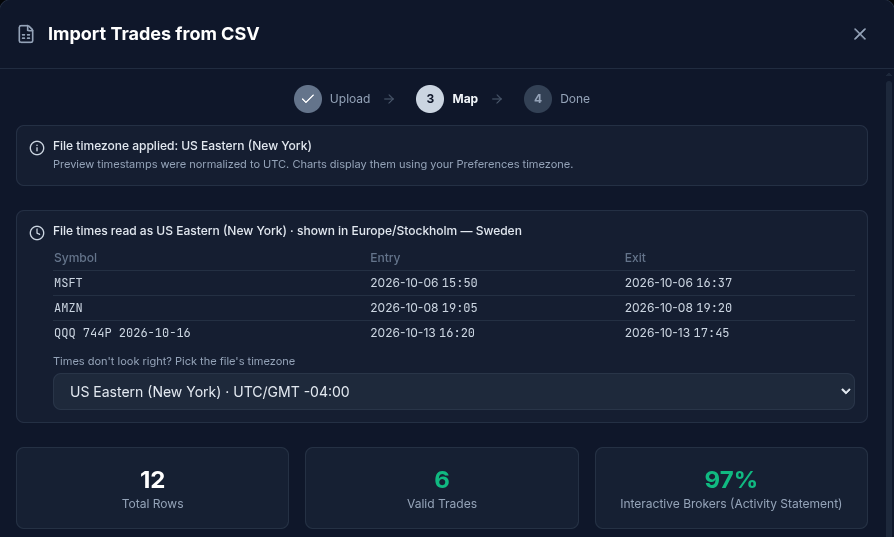
Prefer a file? Download the Activity Statement as CSV or XLSX, open the portfolio, click Import and drop it. The format is detected automatically.
Commissions as IBKR reports them
The Flex sync keeps the realized P&L IBKR computes and stores the IBKR commission of each trade separately, so the net result in SniperJournal follows your statement without counting commissions twice. Files bring the commission per transaction as well.
Nothing to type in. If a file ever arrives without fees, select those trades in the Journal and use Set fees.
Good to know
Stocks, options and futures
Options arrive with strike, expiry and multiplier and are shown as readable symbols. Futures and stocks import alongside them, each trade in its own instrument and currency.
Times
Flex and statement timestamps are read in US Eastern time, the zone IBKR reports in, and converted to the exact instant. If your file looks shifted, pick its timezone in the import preview.
Automatic sync, re-imports skip duplicates
The Flex sync runs on its own in the background, and Sync Now or Sync All run it whenever you want. IBKR updates the Activity Flex Query once a day, after the close, so a day's trades usually arrive the next day. Trades already in the portfolio are matched and skipped, whether they came from a sync or from a file.
Watch the import on video
How to import stock and options trades from thinkorswim and Interactive Brokers (2:30). The Interactive Brokers part starts at 0:36 and the automatic sync at 1:50.
What you get after the sync
- Dashboard with win rate, profit factor, expectancy, drawdown and 30+ metrics
- Calendar heatmap and daily P&L, plus performance by hour and day of week
- Mistake analytics: tag errors and see what each type costs you
- Ghost Mode: your results with the flagged mistakes removed
- AI insights and the AI analyst over your own trades
- Portfolios in USD, EUR, GBP and other currencies, each in its own units
FAQ
Is SniperJournal free for IBKR traders?
Yes. SniperJournal is free. There is no subscription, one-time fee, trial gate or trade limit, and registration is open.
Is the Flex Web Service safe?
Yes. The token only lets SniperJournal download the Flex report you defined; it cannot see your password, place orders or move funds. Your token and Query ID are stored encrypted and you can revoke the token in Client Portal at any time.
Does the sync run by itself?
Yes. Once connected, the Flex sync runs on its own in the background, and you can also run it with Sync Now on the connection or Sync All in the header. It is in beta. Each run fetches the Flex report and imports what is new.
Why don't today's trades show up yet?
IBKR updates the Activity Flex Query once a day, after the close. A day's trades arrive with the first sync after that update, usually the next day, and a position that is still open shows up once it closes.
Which file should I import if I prefer not to connect?
The Activity Statement as CSV or XLSX. The Flex Query CSV and the Transaction History statement work too. The HTML version of the statement is not data and is rejected with a hint.
Does it handle options?
Yes. Options come in with strike, expiry and multiplier, the P&L follows the net cash of each contract, and the symbols are shown in readable form.
My account is not in USD
Create the portfolio in the currency of your IBKR account and the trades keep their own units. Multi-currency statements import with the currency of each trade.